GOVERNANCE · SAFETY · PRACTICE
NOV 16, 2026
BY H.B. HAYES
What is shadow AI?
Shadow AI is AI used for work without company approval, like a reply drafted in a personal ChatGPT account. Why bans fail, and how support teams reduce it.
Shadow AI is any AI tool people use for work without their company's approval or oversight. On a support team, the classic case is an agent pasting a customer's email into a personal ChatGPT account to draft a reply. It's common: in a survey of 2,000 US and UK employees published Jan 27, 2026, 49% said they use AI tools their employer hasn't sanctioned. Bans rarely stop it. An approved tool, short written rules and a record of who agreed to them do more.
TL;DR
- Shadow AI is about approval and visibility, not the brand of tool. An approved tool used outside its approved scope counts too.
- It's widespread: 49% use unsanctioned AI tools (BlackFog, Jan 27, 2026), and 66% have used AI they believed wasn't allowed (PagerDuty, Jun 11, 2026).
- It shows up in breaches: unapproved AI tools figured in 43% of the breaches IBM's 2026 report studied, up from 20% a year earlier.
- Make the approved path the fast path. Pass: you can name every AI tool your agents used on tickets last month, not only the ones you bought.
What counts as shadow AI?
Shadow AI is the use of AI tools, features or connections for work without the company's approval or oversight. It's a branch of shadow IT, which is any software or service used for work without IT's knowledge. The difference is what the tool does with what you give it: an AI tool can store, learn from and rewrite the text you paste in.
On a support team, it usually looks like one of these:
- A personal chatbot account. Customer messages pasted into a personal ChatGPT, Gemini or Claude account to draft or soften a reply.
- The free version of an approved tool. The company pays for a work plan, and the agent uses the free one at home or on a phone. In BlackFog's survey, 34% of respondents used free versions of company-approved AI tools.
- A browser extension that rewrites text inside the helpdesk or inbox.
- A connected app. An AI tool linked to the helpdesk, shared inbox or Slack without IT's sign-off. BlackFog found 51% of employees had connected AI tools to other work systems without IT approval or oversight.
- A meeting or call note-taker recording customer calls.
- An AI feature switched on inside an approved app without anyone deciding to use it. Helpdesks keep adding them. (The Desk 08 covers one.)
What isn't shadow AI: an approved tool, on the approved account, used for the work it was approved for.
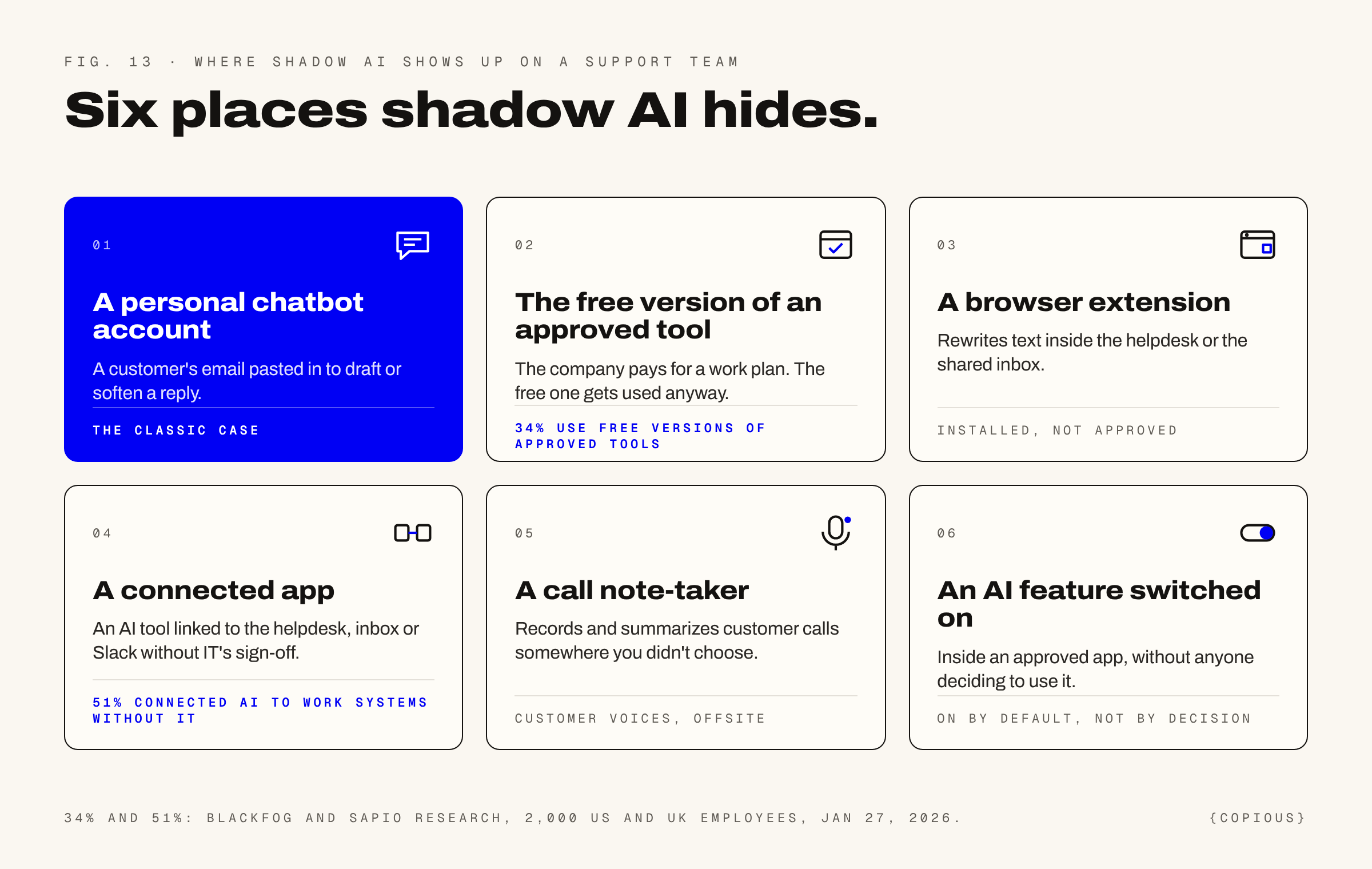
Fig. 13. Where to look before you ban anything. The 34% and 51% are from BlackFog's survey, published Jan 27, 2026.
How common is shadow AI?
Common enough to assume it's on your team.
- 49% of 2,000 US and UK employees at organizations with more than 500 staff said they use AI tools their employer hasn't sanctioned. Of those, 58% use free versions. And 63% said it's acceptable to use AI without IT oversight if no approved option exists. (BlackFog and Sapio Research, fieldwork November 2025, published Jan 27, 2026.)
- 66% of 1,250 office professionals at companies with at least $500 million in revenue said they had used AI tools at work despite believing they weren't permitted. 34% had entered customer data into public AI tools, and 39% said they'd rather use AI without telling anyone. (PagerDuty, with Wakefield Research, in Australia, Japan, the UK and the US, April 2026, published Jun 11, 2026.)
- Leaders take the risk more readily. In BlackFog's survey, 69% of president or C-level respondents said speed outweighs privacy or security, against 37% of administrative staff.
Both surveys come from companies that sell security tools, and both measure what people say they do. Read them as direction, not as a count of your team.
Why is shadow AI risky?
Because the data leaves without a record, and sometimes without a way back.
IBM's 2026 Cost of a Data Breach Report, published Jul 29, 2026 with the Ponemon Institute, studied more than 600 breached organizations. Unapproved AI tools figured in 43% of the security incidents, up from 20% the year before. Breaches involving shadow AI averaged $5.39 million, up from $4.63 million. And 68% of the breached organizations had no policy to oversee AI use or manage shadow AI.
On a support team, the risks are specific:
- Customer data in an account you don't control, under settings nobody checked. (What happens to data pasted into ChatGPT.)
- No answer when a customer asks what happened to their data.
- A promise sent under your name that no rule checked.
- Your privacy notice and contracts, which may not allow customer data to go to a tool your company has no agreement with.
Why don't AI bans work?
Because people use AI to get their work done, and a ban doesn't remove the work.
PagerDuty found that 86% of respondents thought their company had formal AI policies, and 66% had used AI anyway when they believed it wasn't allowed. In BlackFog's survey, 63% said unsanctioned AI is fine when no approved option exists. Put those together: a written policy with no approved tool doesn't stop shadow AI. It hides it.
A ban also teaches people not to tell you. In PagerDuty's survey, 48% of those who used AI against policy faced formal consequences, like warnings or discipline. That's a reason to keep quiet, not a reason to stop.
How do you find shadow AI on a support team?
Start by asking. Then check what you can see.
- Ask, with no penalty for the answer. One anonymous question: "Which AI tools have you used on a ticket in the last 30 days?" Offer amnesty for past use.
- Ask IT what's visible. Sign-in logs, installed browser extensions and apps authorized to connect to your helpdesk, inbox and Slack.
- Check your helpdesk's own AI settings. Which AI features are on, which outside apps and agents are connected, and whose permissions they use.
- Ask contractors and outsourced teams the same question. They're the least likely to see your internal channels.
How do you reduce shadow AI without a ban?
- Approve at least one tool, on a work account. If there's no approved option, people pick their own.
- Write short rules. What never goes into any AI tool, which ticket types AI may draft for, and which decisions a person makes. (Rules agents will actually follow.)
- Publish the rules as a dated, versioned AI policy, and have everyone who touches customer messages sign it. (Why signing matters.)
- Make the approved path faster. Ready prompts for your most common ticket types beat a blank chatbot.
- Keep a record of checks and overrides. Review it monthly. A rule people keep breaking is a rule to rewrite.
- Re-ask every quarter. New tools and new helpdesk features arrive faster than policies change.
Pass: you can name every AI tool your agents used on tickets last month, and say which ones are approved. If you can only name the ones you bought, it fails.
Where Copious fits
Copious keeps your AI policy as a published, versioned document that everyone signs from an email link, and asks them to sign again when a new version goes out. For each ticket type, a ruling gives agents a working prompt with your rules built in, so the approved path starts with a prompt that already fits. The Check lets anyone paste a prompt before using it, and comes back CLEAR, ADJUSTED with the fix shown, or HELD with the rule it breaks. Every check, fix and override is recorded. See pricing.
Copious doesn't detect or block shadow AI, and we won't pretend it does. It makes the approved path easier and keeps a record of it.
Where this doesn't apply
- The survey numbers are self-reported, from vendors that sell security tools, and mostly from large companies. Your team may differ.
- IBM's figures describe organizations that had a breach, not all organizations.
- Detection tools exist. Browser, network and identity tools can spot some shadow AI. We don't rank them.
- Not all unapproved use is a problem. An agent using AI on public information, with no customer data, is low risk. Your policy can allow it in writing.
Frequently asked questions
What is the difference between shadow AI and shadow IT?
Shadow IT is any software or service used for work without IT's knowledge, like a personal file-sharing account. Shadow AI is the AI part of that. The difference is what the tool does with your data: an AI tool can store, train on and rewrite what you paste, so customer details can go further and be harder to pull back.
Is using ChatGPT at work shadow AI?
It is if your company hasn't approved it, or if you're using it outside what was approved, like a personal account when the company pays for a work plan. ChatGPT on an approved work account, used for the work your policy allows, isn't shadow AI. Ask which tool and which account are approved for customer data.
Shadow AI means using unapproved AI tools without your company's knowledge. True or false?
True, with one addition. Shadow AI also covers approved tools used outside their approved scope: the free version of a tool the company pays for, customer data in a tool approved only for public information, or an AI feature turned on inside an approved app without anyone deciding to use it.
How do you detect shadow AI?
Ask first. An anonymous one-question survey, with amnesty for past use, usually finds more than software does. Then check sign-in logs, browser extensions, apps connected to your helpdesk and inbox, and which AI features are on in your existing tools. Repeat it every quarter, because new tools arrive faster than policies change.
Can you get fired for using AI at work?
It depends on your employer's policy and your contract. In PagerDuty's 2026 survey, 48% of people who used AI against company policy faced formal consequences, such as warnings or discipline. If your company has an AI policy, read the current version. If it doesn't have one, ask which tools are allowed before you paste customer data anywhere.
Related: Is it safe to put customer data into ChatGPT? · How to write your company's first AI policy · Insurance and compliance are moving to active AI governance
Sources
Checked Nov 16, 2026.
- Shadow AI research, press release · BlackFog, with Sapio Research, Jan 27, 2026
- Shadow AI is happening within your organization: 2026 Shadow AI Survey · PagerDuty, with Wakefield Research, Jun 11, 2026
- Cost of a Data Breach Report 2026 · IBM and Ponemon Institute, Jul 29, 2026
Copious helps support and CX leaders decide what AI should handle in their queue and what their people should keep, one ticket type at a time. We take no money from AI vendors.