GOVERNANCE · SAFETY · PRACTICE
OCT 29, 2026
BY COPIOUS
How to write an AI usage policy support agents will actually follow
Write AI rules agents can apply mid-ticket: one sentence each, scoped to a ticket type, with who decides and a date. Steps, a template and a 10-ticket test.
An AI usage policy for support agents works when every rule is one plain sentence an agent can apply in the middle of a ticket. Each rule says what it covers, what AI may and may not do, who decides, and when it was set. Keep it to one page, tie it to your ticket types, put it where agents type, and test it on real tickets before you call it done.
TL;DR
- One sentence per rule, scoped to a ticket type or a kind of data.
- Every rule names who decides and carries a date and an owner.
- A good test: three agents give the same answer on ten real tickets without opening the policy.
Why don't agents follow AI policies?
Usually because the policy lives in a document nobody opens mid-ticket. It was written for a legal review, not for the person with a customer waiting.
Meanwhile, the work doesn't wait. If your agents already paste customer messages into AI tools to draft replies, and no written rule says what's allowed, the gap isn't the agent. It's that the rule never reached the place where the decision happens.
And the company answers for the result. On Feb 14, 2024, British Columbia's Civil Resolution Tribunal held Air Canada responsible for wrong information its website chatbot gave a customer about a bereavement fare refund (Moffatt v. Air Canada, 2024 BCCRT 149). On Oct 20, 2026, New York City's Department of Consumer and Worker Protection proposed a rule saying that relying on a technology is not a defense for a violation. It's a proposal, not law.
What is an AI usage policy for support?
An AI usage policy for support is a short set of written rules that tells agents when they may use AI on a ticket, what they may put into an AI tool, and who makes the final call.
It's narrower than a company-wide AI policy. A company policy covers every team. A support policy covers the queue: your ticket types, your customers' data, and the moments where money or accounts change.
What goes into each rule?
Four parts, in one sentence or close to it.
1. Scope. One ticket type, or one kind of data. "Refund eligibility." "Payment card numbers."
2. The line. What AI may do, and what it may not. "AI may draft the reply. A person decides eligibility and sends it."
3. Who decides. A named role, not "someone." "The agent on the ticket." "A team lead, for credits over the policy limit."
4. Set and checked. The date the rule was set, the owner, and when it was last checked. A rule with no date can't be reviewed.
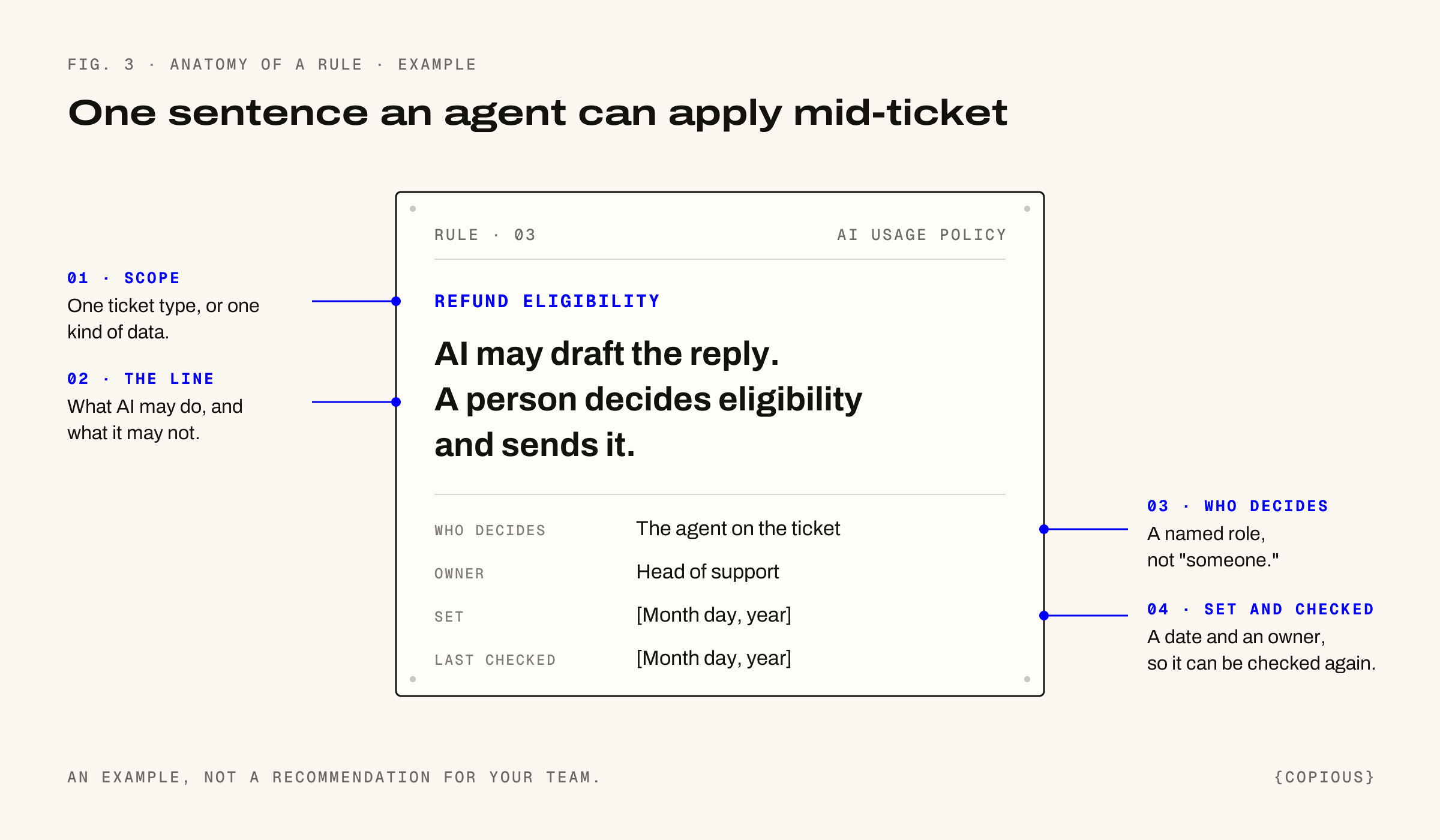
Fig. 3. The four parts of a rule. An example, not a recommendation for your team.
A few example rules, to show the shape. They're examples, not recommendations for your team:
- Refunds and credits: never decided by AI alone. A person approves before it goes out.
- Payment card numbers, passwords and government ID numbers: never pasted into any AI tool.
- Order status: AI may answer from the order system without review.
- Account closures and fraud claims: stay with a person end to end.
How do you write an AI usage policy, step by step?
1. Start from your ticket types, not your tools. List the ticket types your queue handles, by volume. The policy has to answer for each one: may AI be used here, and how? (How to decide that is here.)
2. Write one sentence per rule. Test each one: could a new agent apply it mid-ticket without asking anyone? If not, rewrite it.
3. Say what never goes into an AI tool. Name the kinds of data. Payment card numbers, passwords and government ID numbers are the usual start. Add what your contracts and your industry require.
4. Name the tools agents may use. List the AI tools your company has approved for customer data, by name. Say plainly that anything not on the list is off-limits for customer data.
5. Name who decides where money or accounts move. Refunds, credits, cancellations, account changes. Pick a role for each and write it into the rule.
6. Put the rules where agents work. In macros, in prompt templates, in a check that runs before a prompt is used. A rule an agent only meets in a PDF is a rule they'll guess at.
7. Date every rule, and log the exceptions. When an agent overrides a rule, record who, when and why. Review every rule on a set schedule, and again whenever a rule, a model or a ticket type changes.
Is there a template?
Yes. Copy it, then replace everything in brackets.
AI USAGE POLICY · [TEAM NAME] SUPPORT
Owner: [role] · Set: [Month day, year] · Last checked: [Month day, year]
APPROVED TOOLS
Agents may use these AI tools with customer data: [tool names].
Any other AI tool: no customer data, ever.
NEVER PUT INTO ANY AI TOOL
Payment card numbers. Passwords. Government ID numbers. [Anything else your contracts or industry require.]
RULES BY TICKET TYPE
[Ticket type]: [What AI may do]. [What it may not]. Decides: [role]. Set: [date].
[Ticket type]: [What AI may do]. [What it may not]. Decides: [role]. Set: [date].
[Ticket type]: AI is not used. Decides: [role]. Set: [date].
WHEN A RULE DOESN'T FIT
Ask [role]. If you override a rule, log who, when and why in [place].
REVIEW
Every rule is checked every [period], and whenever a rule, a model or a ticket type changes.
How do you know the policy works?
Run the 10-ticket test.
1. Pick 10 recent tickets from your top ticket types.
2. Give them to three agents. Don't let them open the policy.
3. For each ticket, ask: may AI be used here, how, and who makes the final call?
Pass: all three agents match the policy on all 10 tickets. Anything less, find the rule that caused the disagreement and rewrite it. Then run the test again.
Where this doesn't apply
- This isn't legal advice. If you're in healthcare, financial services or insurance, have counsel read the policy before you publish it to the team.
- It's for the people working the queue. A customer-facing bot needs its own decisions, including disclosure and a way to reach a person. (The Desk 05 covered New York City's proposal.)
- It doesn't replace a company-wide AI policy. It sits under one, and it should agree with it.
- It won't fix a ticket type that's already broken. If a ticket type bounces between people and misses its target, fix the process first. (The handoff data is here.)
Frequently asked questions
Should agents be allowed to paste customer messages into ChatGPT?
Only if that tool is on your company's approved list for customer data, and only after removing what your policy says never goes in, such as payment card numbers and passwords. If nobody has decided yet, that's the first rule to write. Until it's written, assume the answer is no.
How long should an AI usage policy for support be?
One page is enough for most teams. Each rule is a sentence, scoped to a ticket type or a kind of data, with who decides and a date. If an agent needs more than a minute to find the rule for the ticket in front of them, the policy is too long or organized the wrong way.
Who should own the AI usage policy?
The head of support owns it, because the rules follow the queue. Security and legal review it, and each rule names its own owner. Ownership means one person answers for whether the rules are current, and checks them when a model, a tool or a ticket type changes.
How often should the policy be updated?
On a set schedule, and whenever something it depends on changes: a new AI tool, a new model, a new ticket type, or a rule that keeps getting overridden. Overrides are the best signal. A rule agents override every week is a rule that needs rewriting.
Related: What should AI handle in customer support? · Do ticket handoffs predict SLA misses?
Copious helps support and CX leaders decide what AI should handle in their queue and what their people should keep, one ticket type at a time. We take no money from AI vendors.