PRACTICE · GOVERNANCE
NOV 27, 2026
BY COPIOUS
How to clean up your ticket types before you hand any of them to AI
Clean up support ticket categories before you automate: export a month, read what Other hides, merge duplicates, split mixed types and give each an owner.
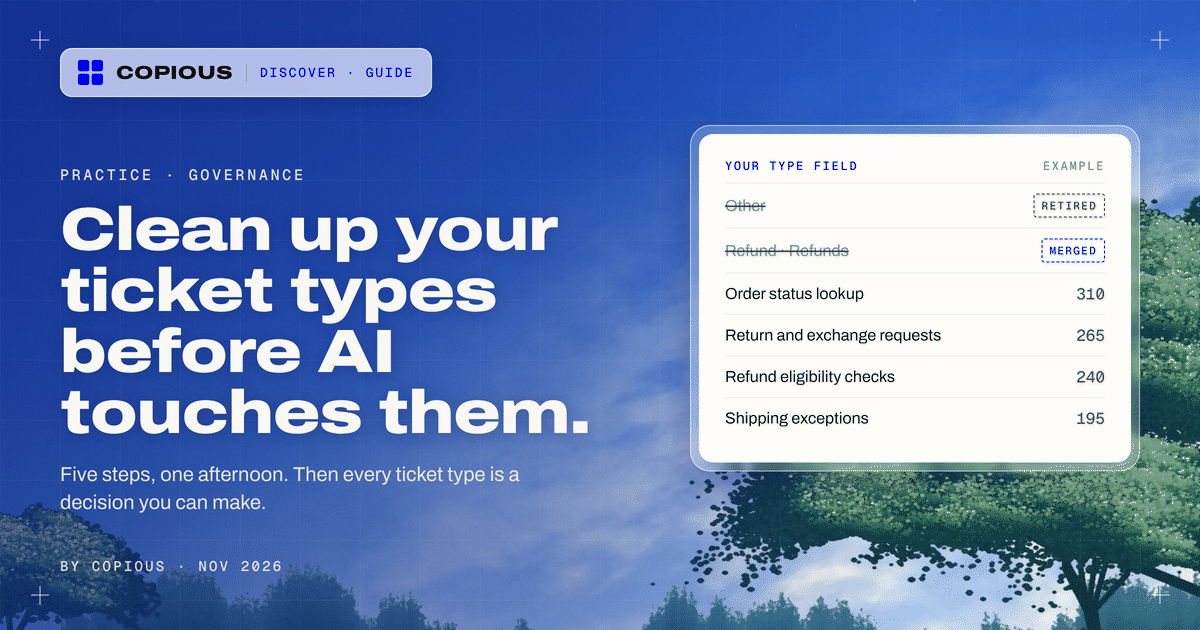
Before any support work goes to AI, make sure each ticket type names one kind of work a customer needs done. Export a month of tickets, read what's hiding in "Other," merge the duplicates, split the types that hold two jobs, and give each type a short description and an owner. Most queues end up with 10 to 30 ticket types.
TL;DR
- A ticket type is a kind of request your support queue handles. Channels, teams and statuses aren't ticket types.
- AI tools learn your queue from its categories. A messy list gets automated as a mess.
- Five steps, about an afternoon: export a month, read "Other," merge, split, describe and assign an owner.
- You're done when "Other" holds under 10% of tickets and every type has an owner.
What is a ticket type?
A ticket type is a kind of request your support queue handles: "refund eligibility checks," "order status lookup," "password reset." It names the work an agent does, in words a customer would recognize.
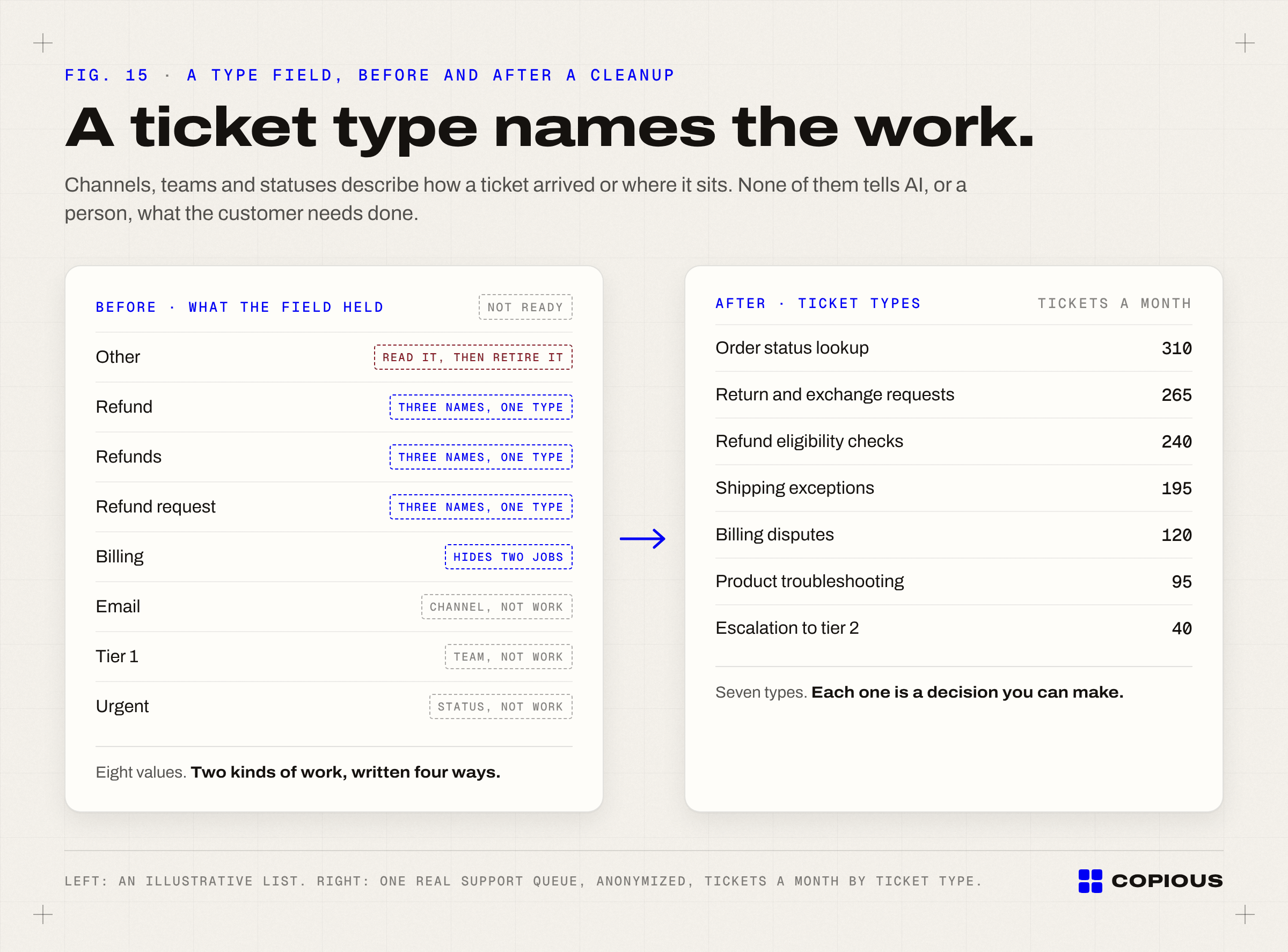
Three things often sit in the same field and aren't ticket types:
- Channels (Email, Chat, Phone) say how a ticket arrived.
- Teams (Tier 1, Escalations) say who holds it.
- Statuses (Urgent, Pending) say where it sits.
"Other" and "General" aren't ticket types either. They're the place the real ones hide.
Why clean up ticket types before you add AI?
Because AI tools learn your queue from the categories you already have. Zendesk's AI agent launchpad, rolling out Nov 5 to Nov 30, 2026, "analyzes your account ticket history to detect common customer topics" and suggests topics and procedures from them. If half your history is filed under "Other," that's what it learns from.
The decision gets worse too. "Billing" might mean a disputed charge, which needs a person who can issue money back, and a request for an invoice copy, which a form could handle. One decision can't be right for both.
There's a timing reason as well. If your Zendesk account bought or trialed Copilot before June 11, 2026, its intelligent triage fields are being migrated between Oct 26 and Dec 4, 2026. After your window, tickets "will no longer have intelligent triage tags added," the "intent" field is renamed "topic," and workflows built on those tags won't run for new tickets. If you're rebuilding those workflows anyway, rebuild them on a clean list.
How do you export a month of tickets?
Every help desk can export tickets to a file. What you need is each ticket's type field (or tags) and its created or closed date. Here's where each help desk puts it, from its own help center:
- Zendesk: open a view of last month's tickets, then choose Export CSV (or Actions, then Export as CSV). The view has to be unfiltered, you can export a view once every 10 minutes, and the file comes by email. Exporting is on Team, Professional and Enterprise plans.
- Freshdesk: go to Tickets, open the All tickets view, set the date range, then click Export and pick CSV or Excel and the ticket fields you want, including Type. You need an Admin or Supervisor role.
- Intercom: open a saved View in the Inbox and choose Export as CSV. It exports the columns you can see, tags resolve to names, and exports over 100,000 rows are refused. Reports also has a dataset export, limited to 10,000 rows in the browser.
- Jira Service Management: a report in your service project can export to CSV, and its columns include Request Type. For wider exports, use a filter and export the results.
- Kustomer: run a search for last month's conversations, choose Export Search, pick the columns and run it. The CSV arrives by email, up to 50,000 rows, on plans that include search export.
You don't need ticket text for any of this. The type field, the date and a count are enough.
How do you clean up ticket types? Five steps
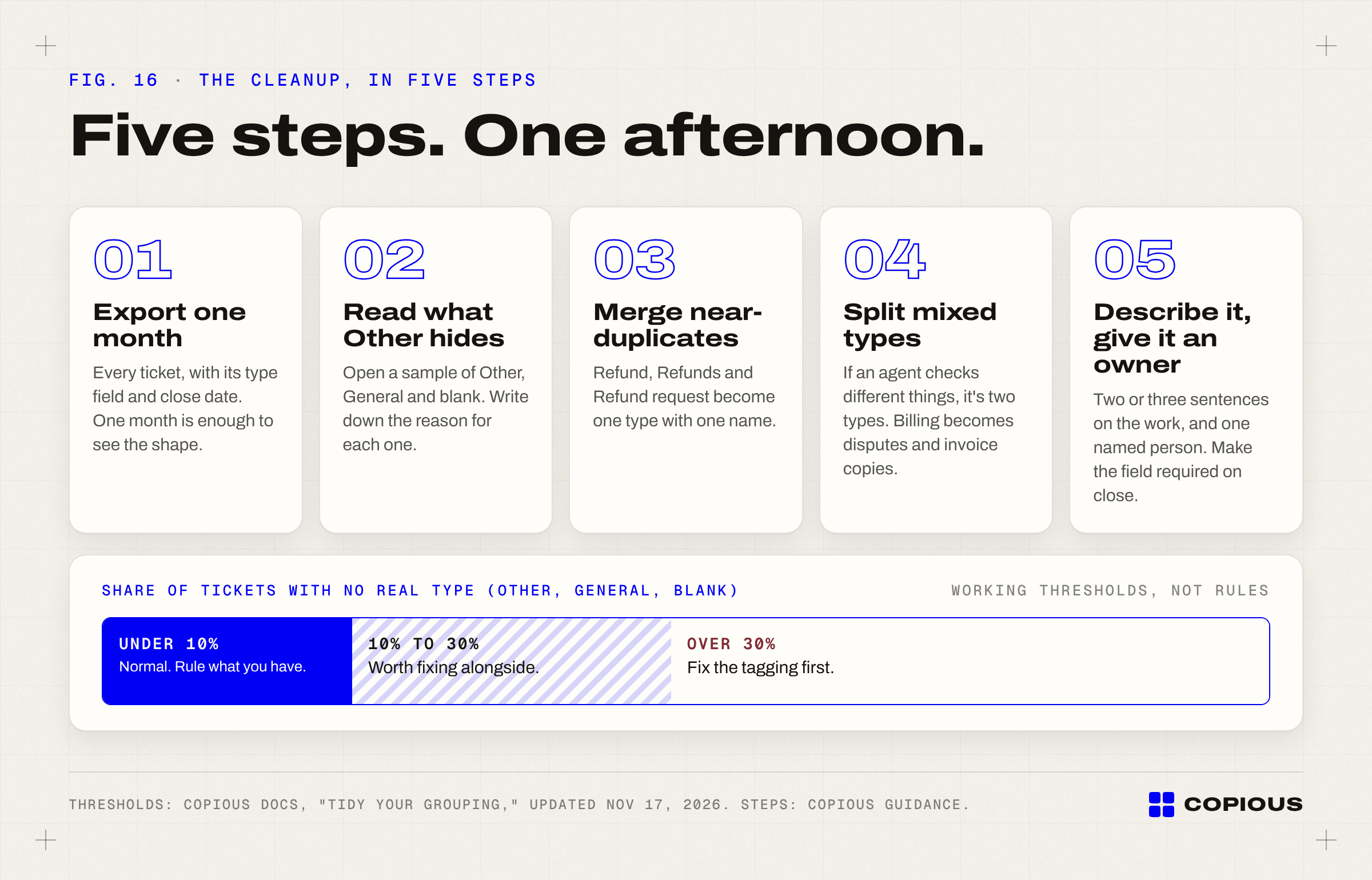
1. Export one month and count by type. Put the export in a spreadsheet and count tickets by the type field. Sort largest first. Note the share in "Other," "General" and blank.
2. Read what "Other" hides. Open a sample of tickets from "Other," "General" and blank. For each one, write the reason in a few words, the way the customer would say it. Stop when new tickets stop giving you new reasons. Most of them will turn out to be types you already have, or two or three you don't.
3. Merge near-duplicates. "Refund," "Refunds" and "Refund request" are one ticket type. Pick one name and map the others to it.
4. Split the types that hold two jobs. The test: does the agent check different things for each? If yes, it's two types. "Billing" usually splits into billing disputes and invoice or receipt requests. "Account" often splits into password resets and account changes.
5. Describe each type, and give it an owner. Write two or three sentences per type: what the agent checks or looks up, when it goes wrong or needs someone senior, and what the customer gets at the end. Name one person who owns each type. Then make the type field required when a ticket is closed, so new tickets land in the list.
Keep the channel, team and status as their own fields. They're useful. They aren't the type.
How do you know the cleanup worked?
Run the export again a month later and check three things:
- "Other" is small. As working thresholds, not rules: under 10% of tickets with no real type is normal; 10% to 30% is worth fixing alongside; over 30% means fix the tagging before you decide anything else.
- Every type names work. No channels, teams or statuses in the list.
- Every type has a description and an owner.
Pass line: one month after the cleanup, fewer than 10% of tickets have no real type, and you can name the owner of every type without looking it up.
What does a clean list look like?
Here's the ticket type list from one real support queue, anonymized. Seven ticket types, ranked by volume:
- Order status lookup: 310 a month
- Return and exchange requests: 265 a month
- Refund eligibility checks: 240 a month
- Shipping exceptions: 195 a month
- Billing disputes: 120 a month
- Product troubleshooting: 95 a month
- Escalation to tier 2: 40 a month
Each row is a decision someone can make: hand it to AI, automate it a simpler way, fix the process first, or keep it with your people. In this queue, four of those types, 650 tickets a month, had no decision at all. A list like this is what makes a gap like that visible: you can't see a missing decision on a type you haven't named.
Where this doesn't apply
- Very small queues. If your whole team can name every kind of request from memory, write the list down and skip the export.
- Help desks you can't change. If the type field is locked by another team or a contract, keep your clean list beside it and map tickets to it in the export.
- Categories other teams report on. Finance or product may rely on the current values. Tell them before you rename anything, and keep a mapping from old to new.
- Tags used as types. Tags work as a type only if each ticket carries exactly one tag that names the work. If tickets carry several, one ticket counts under several types.
Frequently asked questions
How many ticket types should a support team have?
Most queues are covered by 10 to 30 ticket types. Fewer than that and types usually hold two jobs; more and agents start picking the wrong one. The number matters less than the test: each type names one kind of work, in words a customer would recognize, and has an owner.
What should we do with tickets marked "Other"?
Read a sample before you change anything. Write down the reason for each ticket until new tickets stop giving new reasons. Map those reasons to existing types or a few new ones, then retire "Other" or keep it small. Under 10% of tickets with no real type is a reasonable working target.
Should we use tags or a dropdown field for ticket types?
A required dropdown field is easier to keep clean, because each ticket gets exactly one value and the list can't grow by accident. Tags can work if every ticket carries exactly one tag that names the work. When tickets carry several, the same ticket is counted under several types.
Does Zendesk's intelligent triage migration change our ticket types?
It changes the fields, not your categories. Accounts that bought or trialed Copilot before June 11, 2026 are migrated between Oct 26 and Dec 4, 2026. "Intent" becomes "topic," classification values stay the same, and intelligent triage tags stop being added to new tickets, so tag-based triggers and views need updating.
Can AI sort our tickets into types for us?
It can suggest them. Help desk tools now propose topics from your ticket history, and that's a useful first draft. But a tool learns from the categories you already have, so a cleanup first gives it better history to learn from. A person should still own the final list and its descriptions.
Where Copious fits
The cleanup above is the first step of how Copious works. Copious reads the structure of your queue (ticket types, volumes, timing, handoffs and channel) and ranks every ticket type by volume in the Ledger, with its decision or a blank. The empty rows are the point. By default, Copious reads the shape of your queue, not the contents. Ticket reading is a separate switch, off until an owner turns it on. The docs go further on this: Tidy your grouping, Describe a ticket type so the call holds and Choose what to rule first. Start free at copious.app, no card.
Related: What should AI handle in customer support? · Do ticket handoffs predict SLA misses? · Zendesk changes in 2027
Sources
- Zendesk Help Center, Announcing AI agent launchpad, Nov 5, 2026
- Zendesk Help Center, Understanding the intelligent triage ticket field migration, checked Nov 26, 2026
- Zendesk Help Center, Exporting a view of tickets to a CSV file, checked Nov 26, 2026
- Freshdesk Support, How do I export my tickets from Freshdesk?, modified Feb 16, 2026
- Intercom Help Center, Export your conversations data, checked Nov 26, 2026
- Atlassian Support, Export report data from a JSM project using work item filters, Aug 14, 2026
- Kustomer Help Center, Export search results, Apr 11, 2025
- Copious docs, Tidy your grouping, Nov 17, 2026